SOLARTIS INSURE · PLATFORM TOOLS

Platform Tools

Analyze Your Book, Own Your Data, Operate with Confidence.

Contact Us to Learn More


Solartis Platform Tools

 Beyond running your policies, Solartis gives you the tools to understand your business, put your data to work, and keep everything running. Get insight across your entire book of business, keep full and open access to your data to use however and wherever you like, and rely on around-the-clock operations that find and resolve issues before they affect you. Here's a closer look at each. 

Solartis Explorer

Reporting and Analysis

Solartis Explorer provides reporting and dashboards across all your platform data. Build custom dashboards by user role, run predefined reports with filters, and use ad hoc OLAP analysis for deeper insight.

Scheduled reports and data feeds can be delivered daily, weekly, or monthly. Predefined reports span bordereau, compliance, aggregate, transaction, invoicing, premium, and more.

Report

Examples of Predefined Reports

  • Bordereau Reports
  • Jurisdiction/Compliance Reports
  • Production Reports
  • Aggregate Reports
  • Hit Ratio Reports
  • Transaction Reports
  • Invoicing Reports
  • Payment Reports
  • API Metric Reports
  • Policy Register Reports
  • Premium Reports

Book-of-Business Activities

Solartis Explorer helps carriers and MGAs take action at the book of business or business segment level. Analyze the impact of rate changes (What-If Analysis), monitor capacity limits, identify market opportunities, and execute book-level actions at scale.

"What if" Rate Impact Analysis

Model and compare the impact of proposed rate changes across your entire book of business or a selected segment, before moving to production. Evaluate current versus new rates, assess premium changes at renewal, and identify the policies, segments, and programs most affected. Rerun scenarios multiple times as needed. 

Aggregate Management

Monitor Total Insured Value (TIV) against defined capacity limits. When a limit is reached, Aggregate Management pauses the ability to bind or issue new business policies or refers geographic regions for review, then restarts automatically once aggregate levels return to an acceptable range.

Carrier or Subsidiary Comparison

Compare your current book of business, or a segment of it, against other carriers' or subsidiaries' eligibility rules to identify available market options, then automatically flag or rewrite eligible policies based on market availability.

Account Migration

Migrate policies in bulk, a full book or a selected segment, from one carrier to another, or from one system to another (for example, from a legacy system to a modern system).

Your Data, Always Accessible

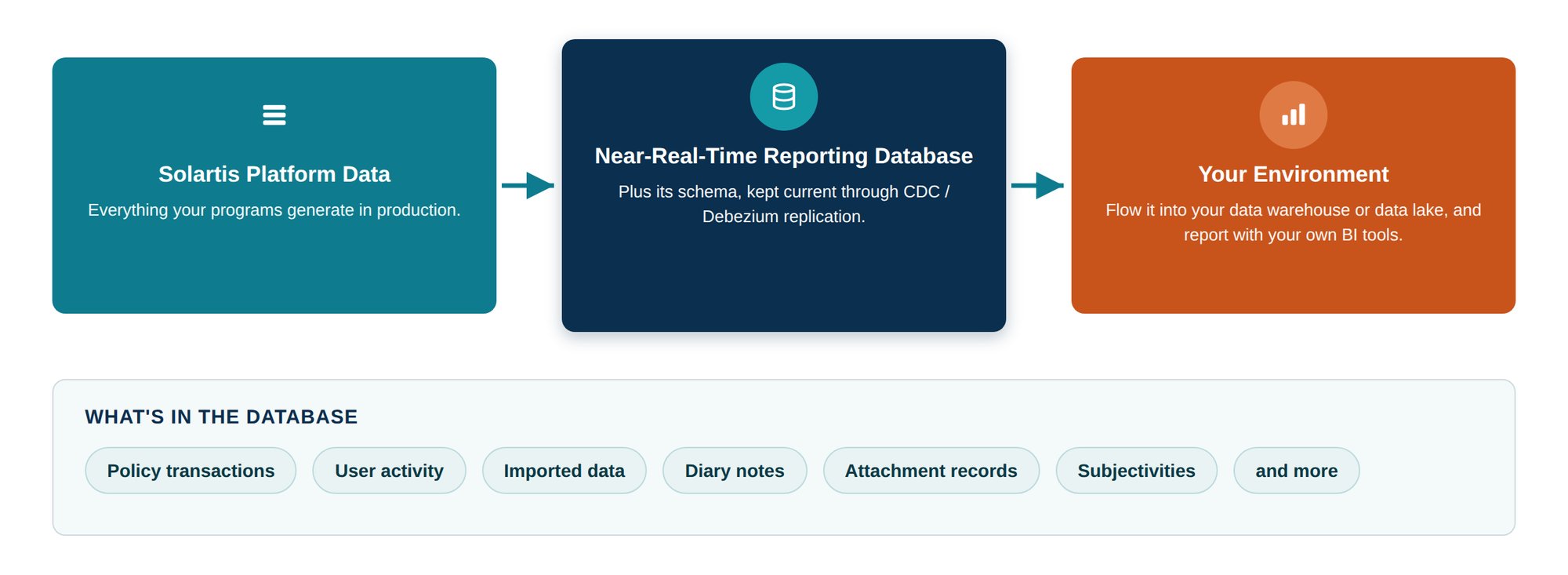
Your data stays yours and stays open. Solartis provides a near-real-time reporting database, kept current through change data capture (CDC), plus its schema, so you can flow the data into your own data warehouse or data lake for custom reporting and analytics with your preferred BI tools. The database contains all policy transactions, user activity, imported data, diary notes, attachment records, subjectivities, and more.

Solartis_Your_Data_Accessible

Solartis Monitor, Jarvis AI, and our Monitoring Specialists, 24×7

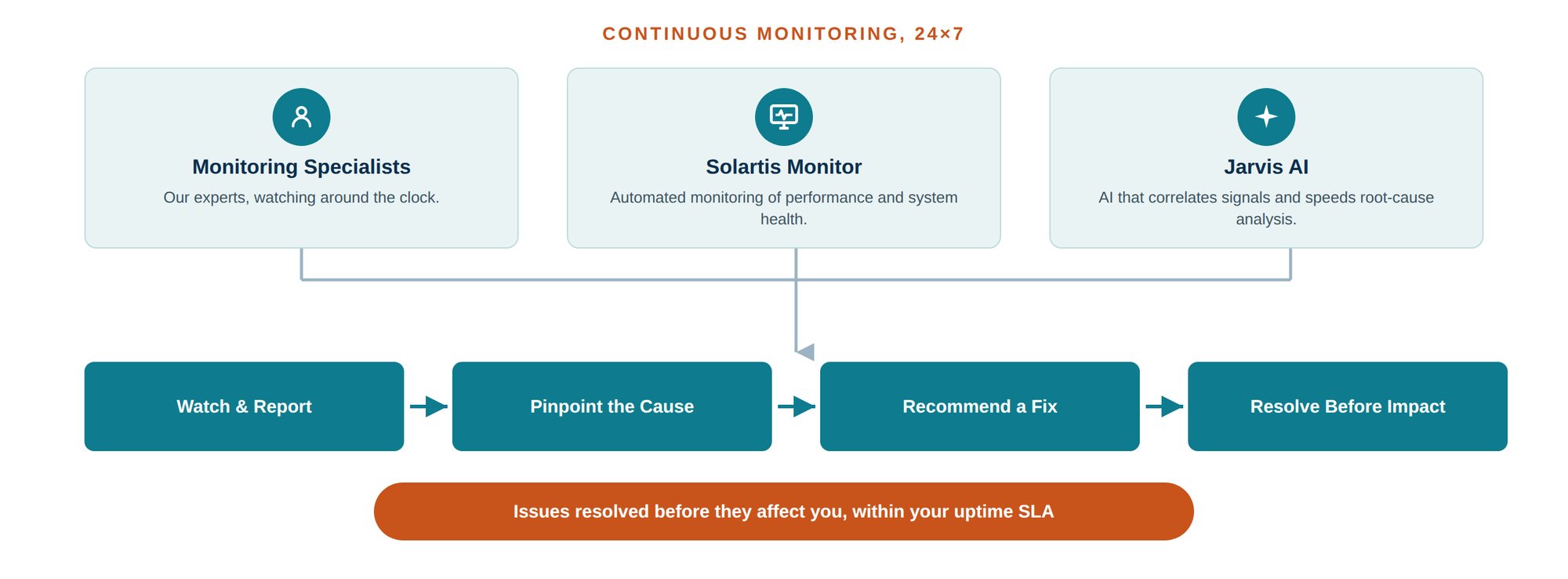
Once your programs are in production, Solartis keeps your systems up and running around the clock. Monitoring brings together three things: our Monitoring Specialists, Solartis Monitor, and Jarvis AI. Together, they continuously watch performance and system health and report on what they see. When something looks wrong, they pinpoint the likely cause and recommend a fix, so issues are caught and resolved before they affect your operations, and we stay within our uptime SLA.

Solartis_Monitoring_247

Platform Tools | Frequently Asked Questions

How can an insurer see the premium impact of a rate change before it goes live?

With Solartis Explorer, carriers and MGAs run their in-force or renewal policies against proposed rates or rules in a non-production environment and compare the results with current production. The report shows current and new premiums side by side, with the change in dollars and percentage for each policy. Users can filter to a segment, test scenarios such as rating every policy as frame construction, and rerun as often as needed.

Can a policy administration system make changes across an entire book of business?

Yes. Most policy administration systems work one policy at a time, but Solartis Explorer acts on a full book or a selected segment. Carriers and MGAs use it to manage aggregate exposure, compare carrier eligibility, flag or rewrite policies at renewal, and migrate policies in bulk.

How do carriers and MGAs manage aggregate exposure against capacity limits?

Solartis Explorer monitors Total Insured Value (TIV) against capacity limits by geographic area, including quoted business that hasn't bound yet. When a threshold is reached, it pauses binding or refers the area for review, then restarts automatically once aggregate levels return to an acceptable range.

How can an MGA compare its book against other carriers' eligibility rules?

Solartis Explorer compares a book of business, or a segment of it, against the eligibility rules of other carriers or subsidiaries to show where each policy could be placed. Eligible policies can then be flagged or rewritten automatically at renewal.

How do you migrate a book of business off a legacy policy administration system?

Solartis Explorer migrates a full book or a selected segment from a legacy system to Solartis Insure, or from one carrier, subsidiary, or agent to another. Migrated policies become native Solartis transactions, so they work as if they were entered directly. Migrations can run all at once or in batches ahead of each renewal.

Does Solartis Explorer work with other policy administration systems?

Yes. Solartis Explorer can run source data from any system against any rating or policy administration system it connects to through APIs, including systems other than Solartis.

Does Solartis Explorer need IT for every analysis?

No. Solartis and the customer's team set up each Solartis Explorer business model once, defining the business need, source data, target system connection, and report format. After that, business analysts run analyses on their own whenever they need to.

What reporting should a P&C policy administration system include?

A P&C policy administration system should include predefined operational and compliance reports, ad hoc analysis, role-based dashboards, scheduled data feeds, and open access to the underlying data. Solartis Insure includes all of these through Solartis Explorer and a near-real-time reporting database, across personal and commercial lines.

Which policy administration systems produce bordereau reports?

Solartis Insure produces bordereau reports as part of its predefined reports, along with jurisdiction and compliance, production, aggregate, hit ratio, transaction, invoicing, payment, policy register, and premium reports. Each report can be filtered, for example by market, quote status, or date range, and exported to Excel.

Can business analysts build their own insurance reports without IT?

Yes. In Solartis Explorer, business analysts use point-and-click analysis to filter and pivot data by attributes such as state, protection class, or year built, drill down to matching policies, and view the results as charts. They can also build their own role-based dashboards.

Can Solartis deliver scheduled reports and data feeds?

Yes. Solartis produces reports and data feeds daily, weekly, monthly, or on another schedule, and delivers them automatically.

How can an insurer get its policy data into its own data warehouse?

Solartis replicates each customer's data in near real time to a reporting database in the customer's own environment and provides its schema. The database includes policy transactions, user activity, imported data, diary notes, attachment records, subjectivities, and more, ready for the customer's BI tools, data warehouse, enterprise data platform, or downstream systems.

How does Solartis monitor the platform to prevent issues?

Solartis Monitoring Specialists, Solartis Monitor, and Jarvis AI watch performance and system health 24×7. When something looks wrong, they pinpoint the likely cause and recommend a fix, so issues are resolved before they affect customer operations.


Schedule Time With Us!

Connect with our experts for a demonstration of our Platform Tools